

## Video Subtitler – App giúp tạo cả Soft và Hard Subtitle hướng đến khách hàng cá nhân 🎬✨
Chào mừng bạn đến với **Video Subtitler** – ứng dụng đột phá dành cho MacBook, giúp bạn dễ dàng tạo ra cả phụ đề mềm (soft subtitles) và phụ đề cứng (hard subtitles) chỉ trong một công cụ duy nhất! 🚀 Dù bạn là nhà sáng tạo nội dung cá nhân, người làm phim độc lập hay đơn giản là muốn nâng cấp trải nghiệm xem video của mình, Video Subtitler đều đáp ứng được mọi nhu cầu.
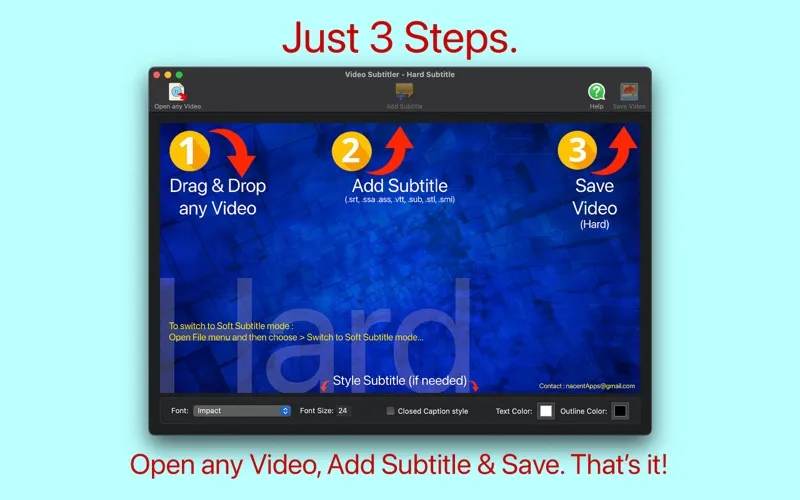
Với giao diện trực quan và quy trình làm việc 3 bước đơn giản: Kéo & Thả video 🖱️, Thêm phụ đề ✍️, và Lưu video 💾, việc thêm phụ đề chưa bao giờ dễ dàng đến thế. Ứng dụng hỗ trợ đa dạng các định dạng phụ đề phổ biến như .srt, .ssa, .vtt, cùng với hầu hết các định dạng video thông dụng. 🎞️
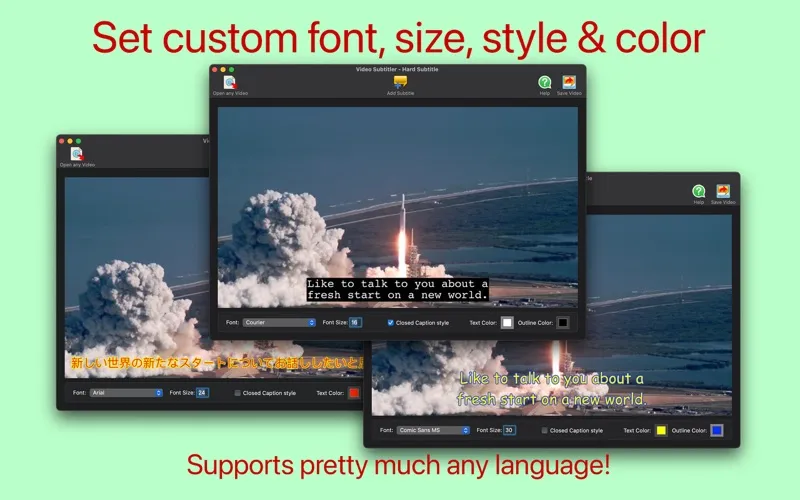
Bạn có thể tùy chỉnh phong cách phụ đề một cách chi tiết: chọn font chữ 🔡, kích thước, màu sắc văn bản và viền chữ, hay thậm chí là định dạng theo kiểu Closed Caption (CC) cho phụ đề cứng. Với chế độ phụ đề mềm, bạn có thể thêm nhiều track phụ đề với ngôn ngữ khác nhau, dễ dàng bật/tắt khi phát lại. 🎧
Để trải nghiệm sức mạnh của Video Subtitler, bạn cần:
* **Phiên bản macOS:** Yêu cầu **macOS 10.14 trở lên** 🍎.
* **Cấu hình tối thiểu:** Dung lượng ứng dụng khoảng **134.1 MB**.
Hãy để Video Subtitler trở thành trợ thủ đắc lực, giúp nội dung video của bạn tiếp cận gần hơn với khán giả quốc tế và mang lại trải nghiệm xem tuyệt vời nhất! 👍🌟
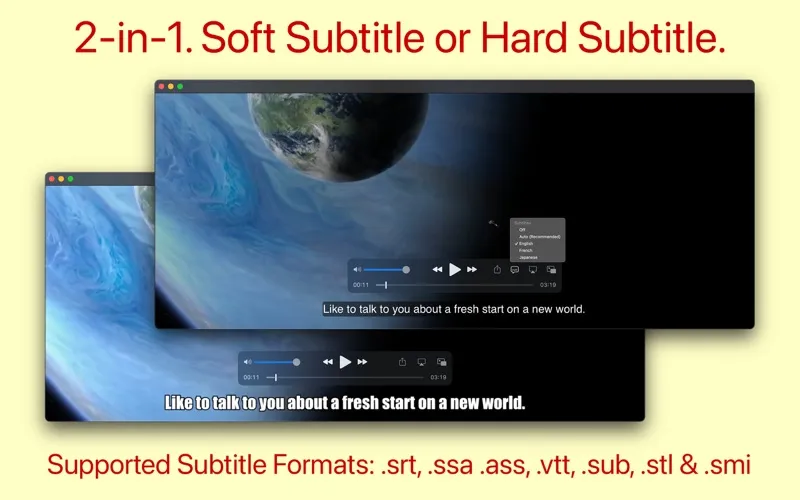
Video Subtitler là app 2 trong 1, vừa có thể tạo Hard Sub và Soft sub cho video chỉ với 3 bước:
1. Drag & Drop any video.
2. Add Subtitle(s).
3. Save Video. That’s it!
Hard Subtitle mode:
• Subtitle text permanently embeds above the video (which cannot be extracted or removed).
• Know the look & placement of subtitle text before exporting.
• Ability to set font, font size, text color and text outline color.
• Ability to set Closed Caption (CC) style or Subtitle styled text.
Soft Subtitle mode:
• Subtitle resides as a track in the output video. Which can be turned ON/OFF using the video player.
• Add multiple subtitles at one shot.
• Ability to choose the tracks in the output video before exporting.
• Losslessly encodes to .mp4 only if necessary.
• Automatically detects the language of Subtitle and tags them so that it shows up in QuickTime Player for easy selection.
Common:
• Output Video is compatible with QuickTime, iPhone TV App, Apple TV and most other video players.
• Supports pretty much any language.
• Supported Input subtitle file formats : SubRip(.srt), SubStation Alpha(.ssa), Advanced SubStation Alpha(.ass), SubViewer(.sub), WebVTT(.vtt), Spruce(.stl), SAMI(.smi) etc.,
• Supported Input video formats : .mp4, .mov, .m4v, .mkv, .mpg, .avi, .webm, .wmv, .dv, .ogg, .ogv, .ts, .flv, .mts, .m2ts, .3gp, .asf, m2v, mxf, .wtv and everything else.
Soft Subtitles vs Hard Subtitles
Hard subtitles are part of the video itself (superimposed text), they are embedded over the video and cannot be turned ON/OFF while the video is playing. Example: Creating YouTube Video with transcription.
Soft Subtitles are added as a separate track in a video file and they are not part of the video itself, so it can be turned ON/OFF while the video is playing. Example: Creating an Apple TV Video with different language subtitles.
App Store: apps.apple.com/us/app/video-subtitler/id974127294
Tương thích: OS X 10.14 or later, 64-bit processor
Video Subtitler 3.0

