ProPresenter 7 – Công cụ trình chiếu dễ dàng và chuyên nghiệp
### **ProPresenter 7 – Công cụ Trình chiếu Dễ dàng và Chuyên nghiệp cho MacBook** 🚀
✨ Nâng tầm bài thuyết trình của bạn với ProPresenter 7, phần mềm trình chiếu mạnh mẽ được thiết kế đặc biệt cho người dùng MacBook! Dù bạn là cá nhân sáng tạo, nhà truyền giáo hay người điều hành sự kiện nhỏ, ProPresenter 7 mang đến sự kết hợp hoàn hảo giữa tính dễ sử dụng và khả năng chuyên nghiệp, giúp bạn tạo ra những buổi trình chiếu ấn tượng. 🌟
💻 **Yêu cầu Hệ thống Tối thiểu:**
* **Phiên bản macOS:** Yêu cầu macOS 10.14 (Mojave) trở lên. 🍎
* **Cấu hình:** 8GB RAM (khuyến nghị), card đồ họa hỗ trợ OpenGL 2.0 trở lên. 💡
ProPresenter 7 cho phép bạn dễ dàng nhập và sắp xếp lời bài hát 🎤, video 🎬, hình ảnh 🖼️, và slide thuyết trình. Giao diện trực quan giúp bạn tùy chỉnh bố cục, thêm hiệu ứng độc đáo ✨ và quản lý nội dung đa phương tiện một cách hiệu quả. Tính năng “Stage Display” 🖥️ cung cấp thông tin cần thiết cho người thuyết trình, trong khi khả năng xuất đa màn hình 📺 đảm bảo nội dung của bạn hiển thị hoàn hảo trên mọi thiết bị. Hãy biến ý tưởng của bạn thành hiện thực với ProPresenter 7 – giải pháp trình chiếu đỉnh cao cho mọi nhu cầu cá nhân! ✅
ProPresenter 7 là một ứng dụng trình chiếu mình sử dụng nhiều nhất trong các buổi trình chiếu trên các màn hình LED, các sự kiện livestream đơn giản. Có thể nói phần mềm là cánh tay đắc lực trong các sự kiện, hội nghị, hội thảo, trình chiếu trong nhà thờ…
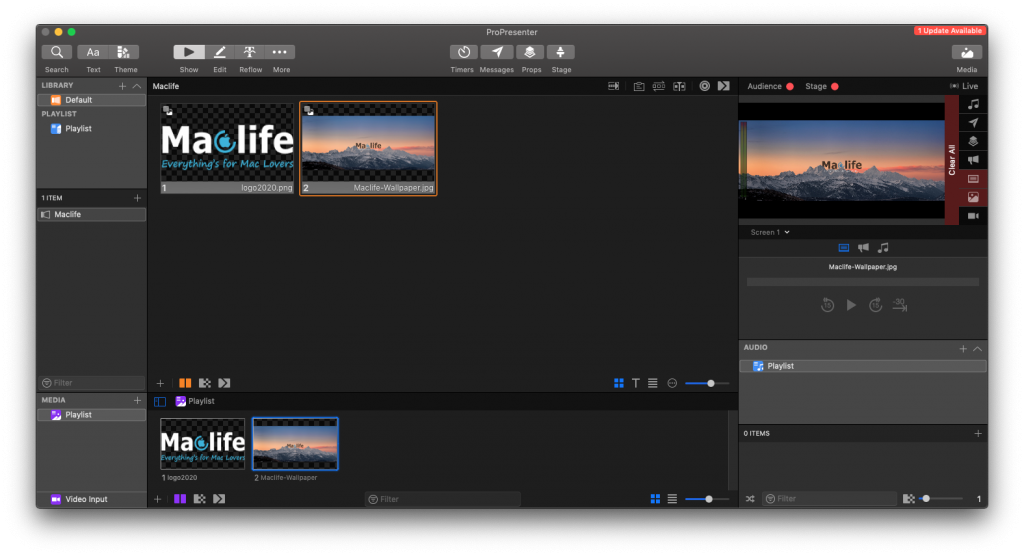
ProPresenter 7 đã có khá nhiều template giúp việc trình chiếu ngày càng chuyên nghiệp hơn. Giao diện người dùng được thiết kế lại đẹp hơn, sử dụng dễ dàng hơn, nó cho phép bạn thay đổi nội dung slide bằng cách sử dụng các thao tác kéo và thả. ProPresenter cung cấp cho bạn các khả năng tùy chỉnh đầy đủ cho phép bạn thay đổi màu nền, chèn các hộp văn bản và thay đổi kiểu văn bản. Nó cũng có khả năng kiểm tra chính tả sẽ đảm bảo rằng chính tả là chính xác. Tất cả trong tất cả ProPresenter là một ứng dụng tuyệt vời cho phép bạn tạo các bài thuyết trình hấp dẫn một cách dễ dàng.
Tính năng mới trên bản 7.4
Nhấn để xem chi tiết
Version 7.4:
New! Adds support for more native languages than ever before including: English, Spanish, Portuguese, French, German, Korean, Russian, & Norwegian
New! Adds new logic that allows for backgrounds videos to no longer activate when being triggered a second time
New! Adds the ability to set line fill to current line width or max line width
New! Adds multiple additions to linked objects including: Current & Next Slide Group Name, Current & Next Playlist Item, Number of Remaining Slides, & so much more!
New! Adds in-app licensing option for “active” or “inactive” allowing users to use a computer registered as “inactive” for editing with Bibles
New! Adds support for macOS Big Sur, Apple Silicon including the new M1 processor, & Apple’s Metal platform for significantly increased graphic performance
Fixes an issue where clearing and triggering props transitions incorrectly
Fixes a bug that causes the text to appear doubled while editing
Fixes a bug that causes text to be clipped when the line height is set to a value less than 1
Fixes an issue where clearing to logo does not transition as expected
Fixes an issue with stage message visibility links not hiding and showing the object when expected
Fixes a bug that causes list settings to not apply with the theme
Fixes a bug that causes chord charts to not be included with presentation bundle exports
Fixes an issue with audio inputs that operate at a sample rate other than 48k
Fixes a bug that causes the clear action to only cut instead of using the selected transition
Fixes a bug that causes font selection to be unavailable when moving between editors
Fixes an issue with slide builds only using the cut transition instead of the specified transition
Fixes a bug that causes playlist imports to show two copies of the imported presentations in the library
Fixes a bug that causes text to be clipped with some stroke settings
Fixes a bug that prevents triggering with number entry if the keyboard focus is in the playlist view
Fixes a bug where a look change causes the slide background color to inadvertently show
Fixes an issue that causes MIDI actions to not import on macOS when created on Windows
Fixes an issue where a chord chart might not update on the first click
Fixes an issue with SDI and NDI outputs sending audio on startup when the option is not selected
Fixes a bug that causes the slide editor to erroneously scroll while adjusting the position of an object