Phần mềm tạo nhiều hiệu ứng đẹp cho ảnh, gọn nhẹ, đơn giản, dễ sử dụng
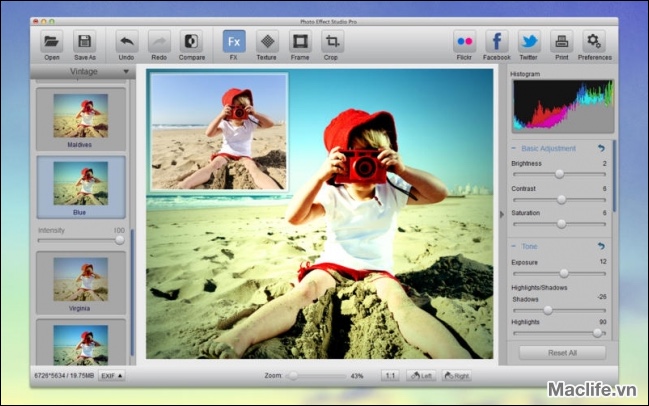
A large amount of powerful photo effects carefully developed with professional photographers and graphics designers for all of your image editing needs — simplifying common tasks and providing some of the most exciting filters available today. Some Effect categories include:
•Lomo
•Neno
•Monochromatic
•Art
•Vintage
•Black & White
•Overlay
•Texturize
•Old Picture and many more
2. Catch the viewer’s eye with over 20 custom frames to choose among
3. Support more 20 powerful Vignette styles to choose among
4. Huge number of highly controllable combinations of Effects, Vignettes, and Frames, using an overlapping layered structure.
—-Selecting an FX photo effect from the palette of over 80 base palettes, allows further choices, from the Vignettes (over 20), and the ability to complete the image with a Frame (Over 20).
5. The user interface is so easy to use and straightforward, you don’t need a manual to start, words fail us, you just have to try it! .
6. The GUI uses a split panel approach, with powerful tools allowing additional fine tuning on top of the photo effects, including Exposure, Brightness, Saturation, Rotate, Curve adjustment, Color Balance, Color Temperature and Tint adjustment, Lens Correction, Highlight/Shadow adjustment, White and Black point adjustment, just to name a few, many levels of fine tuning are available.
7. We have made waiting for your results a thing of the past. All of the fine adjustment controls in Photo Effect Studio are speedily applied in real time!
8. Supports image resolution up to 40 mega-pixels.
9. Supports numerous image formats including: TIFF, JPEG, PNG, BMP
10. Support the widest range of the RAW file format, over than 100 camera RAW formats, more than any other software package in the Mac App Store. Some of the RAW file format includes:
• CRW
• RAW
• CR2
• RAF
• NEF
• DNG
• RW2
11. Supports HDR image format including HDR, EXR etc.
12. Save your image as JPEG, PNG, 8-bt TIFF, 16-bit TIFF, BMP, HDR, EXR and more.
13 Superior Color management including sRBG, AdobeRGB, and ProPhoto color space
14. We have made it easy for you to share your amazing images with popular social media such as Flickr with only a click.
This app has been beta tested by leading photographers, graphics designer and Mac users all around the world to ensure that it includes everything that any photo enthusiast would ever need
Photo Effect Studio is compatible with Mac OS 10.6.6 or later. Photo Effect Studio is fully optimizes for Mac OS X Lion
What’s New in Version 3.2.0
1. Add a lot of new amazing effects.
2. Fix minor bugs.
Photo_effect_studio_pro_v3.2.0
Photo Effect Studio Pro v4.1.1