One Switch – mang những “Nút” hữu ích lên menu bar
60
thought
The user wants an introduction to a Macbook software called “One Switch”.
The introduction should:
1. Clearly introduce the software and its purpose (bringing useful “buttons” to the menu bar for personal users).
2. Mention the macOS version requirement and minimum system configuration.
3. Be 12-15 lines long.
4. Use many beautiful icons to highlight the content.
Since I don’t have direct knowledge of this software, I need to search for it first. I will use `concise_search` to find information about “One Switch macbook”. Then I will use `browse` to get more details if needed, specifically looking for macOS version and system requirements.
**Search Query:** “One Switch macbook”
**Browse Strategy:** If search results provide URLs, I will browse them to gather information on features, macOS compatibility, and system requirements.
After gathering information, I will construct the introduction following the user’s requirements, including the length and the use of emojis.
Let’s start with the search.
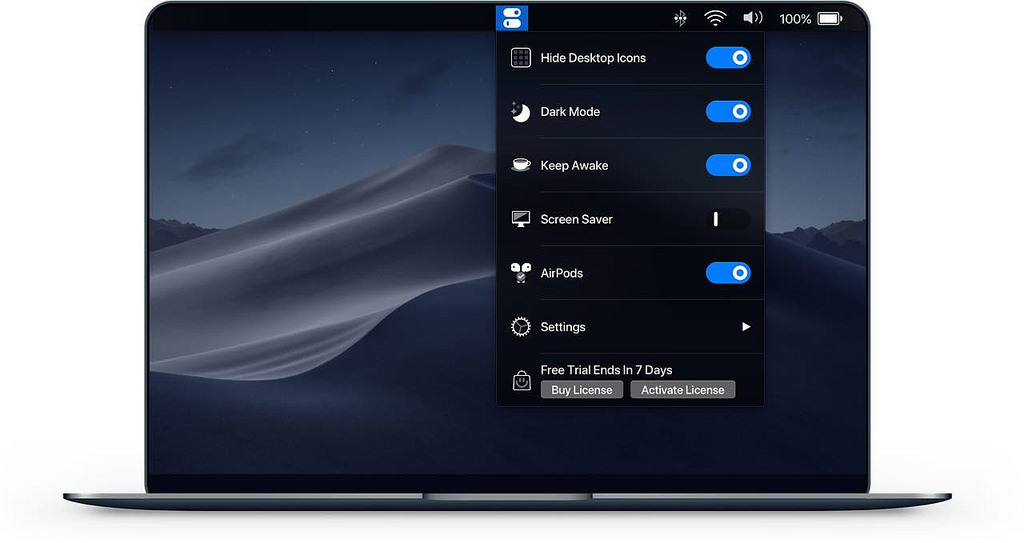
One Switch là một ứng dụng có dung lượng cực nhỏ nhưng lại cực kỳ hữu ích. Nó được thiết kế tối giản nhưng lại vô cùng tiện dụng, những nút hữu ích nhất, hay sử dụng nhất nhưng thường phải truy cập nhiều bước nay sẽ được mang ra ngay thanh Menubar. Nói có thể có hiểu nhưng bạn chỉ cần xem hình bên dưới là hiểu ^_^
Hide desktop icons
Hide your messy desktop with a single click. Dark Mode
Switches the Dark mode at any time. Stay awake
Prevent your Mac to sleep or screen saver display. Screensaver
Sometimes you like to turn it on manually. AirPods
Connect AirPods with your Mac in just a second.