In using the app, there will be a about 2 to 3 seconds of latency (lag). So this mirroring is not suitable for gaming.
However, it is very suitable for watching movies, giving presentations, watching photos, and much more!
The quality of your experience will be dependent on the quality of your local network. Some tips to enhance the experience:
1. Restart your router. Just take out the power plug, wait 10 seconds and put it back in. This resets your router and will make your home network faster and more stable. Why this works? Routers are in essence little computers, with software. Software will have small memory leaks and some processes will stop working correctly over time. That’s why it is a good idea to reset your router once in a while. Our recommendation: once a week.
2. Don’t do network intense work while screen mirroring. As explained, screen mirroring is network intense. For the best performance, don’t do other network intense work at the same time. This includes making timemachine backups over the network and uploading/downloading large files from the internet while screen mirroring.
3. Put your Mac and your Android TV on the same router channel. Some routers (dual band) have create both a 2.4Ghz and a 5Ghz wireless network. For the best performance, put your Mac and your TV on the same network. Preferably the 5Ghz network. But definitely not the Mac on 5Ghz and the TV on 2.4Ghz, because that will negatively impact the performance of screen mirroring.
4. Use an AC or N router. Newer routers support Wifi AC and N. Older routers might only have Wifi B and/or G. B and G are not really up to scratch anymore for modern networking tasks, so go for an AC or N router. If your router supports AC and N, also make sure that your router is set to use either the Wifi N or Wifi AC networking.
How the app works:
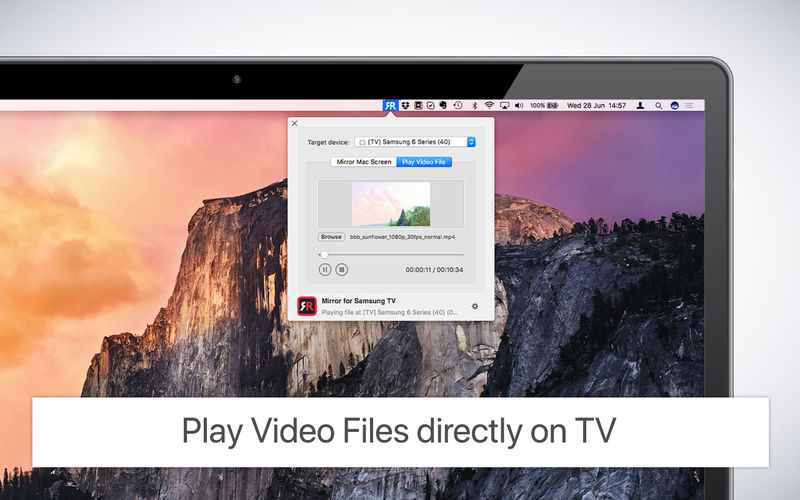
First, make sure that your Samsung TV is on the same local network and same subnet as your Mac. The TV should not be in screen mirroring mode, but just on “TV” Mode or any HDMI IN port.
After launching the app, you will see the app icon appearing in the top bar of your Mac and the app will look for your TV on the network. It will show your TV when it has found it. Now, you have two options: