

Copy’em Paste là một trình quản lý clipboard mạnh mẽ giúp tăng hiệu suất làm việc hàng ngày của bạn.Nó ghi lại lịch sử clipboard của bạn về văn bản, hình ảnh, liên kết và ảnh chụp màn hình đã sao chép, v.v. và cho phép bạn dán chúng bất cứ lúc nào.
Cũng như các phần mềm quản lý clipboard khác, Copy’em Paste giúp bạn sao chép nhiều mục khác nhau (vì vậy giảm thiểu việc chuyển đổi giữa các ứng dụng), sau đó để lưu trữ hoặc dán vào chỗ nào tuỳ ý bạn.
KEY FEATURES
- Automatically remembers the things copied by regular copy/cut commands
- Can store unlimited number of clippings
- Accepts text, images, links, HTML, code, PDFs, files, and clippings of proprietary formats
- Instant access to clippings via menubar or customizable Command-Shift-V
- Can paste clippings via drag-and-drop into target applications
- Can be configured to paste into VNC, NoMachine, Parallels, etc.
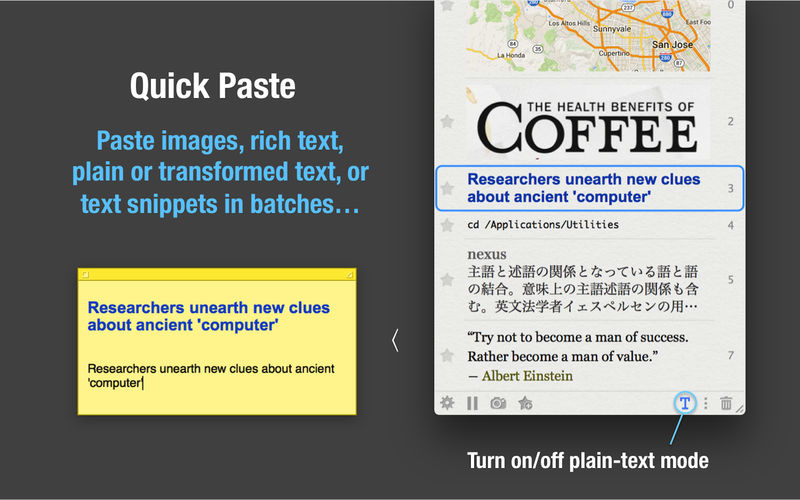
- Batch pasting of multiple snippets
- Can paste clippings with local shortcuts (‘0’ to ‘9’ and ‘a’ to ‘z’)
- Can paste clippings with unlimited number of global shortcuts
- Plain-text mode option to paste any rich text as plain text
- Hold Option key to switch between pasting text as plain text or rich text (i.e., temporarily do the opposite of plain-text mode)
- Text transformation options (capitalization, line-unwrapping, stripping whitespace, adding prefixes/suffixes, etc.)
- Can enable/disable text transformations with global shortcuts
- Press Space or Left-Arrow key to preview clippings in a large, resizable popover window
- Unlimited number of lists for you to organize your favorite clippings
- Auto-star mode where newly arrived clippings are automatically put into the current starred list
- Fast switching between lists via app-local shortcuts (such as Command-1, Command-2, etc.)
- Use swiping or Command-[ and Command-] shortcuts to navigate backward and forward between lists
- Sort clippings by drag-and-drop, creation dates, most-recently-used dates, and paste frequency, etc.
- Rearrange clippings in starred lists via drag-and-drop
- Find clippings by search, content-type filtering, and application-name filtering
- Fast searching, with search-as-you-type, and options to auto-focus and auto-clear the search field
- Can edit text clippings
- Can assign names to clippings or edit them
- Open clippings window next to current mouse location (in order to minimize mouse movement)
- Option to keep the window open after each paste operation; by default, the window automatically closes after use
- Capture screenshots (full screen, windows, selected areas, etc.) as clippings
- Blacklist applications, so clippings from them won’t be saved
- Stop (or resume) collecting new clippings
- Can delete selected clippings, selected sets, or entire lists
- Change the theme, with option to show text clippings in original colors or grayscale
- Automatically switch theme according to the OS X theme setting
- Option to play sounds when copying and/or pasting

Tương tích: OSX 10.10 trở lên
Copy_Em_2.8.3







